Skip to content
AIM OFFICE

AIM Anonymise

Remove personal data before you share.

AIM Anonymise finds ID numbers, IBANs, phone numbers, email addresses, postal addresses and names in your text files, documents, PDFs, spreadsheets and images, and redacts them, labels them or swaps them for fictitious data. All on your device.

  • ID numbers and IBANs validated
  • DOCX, PDF, XLSX and images
  • Nothing leaves your device
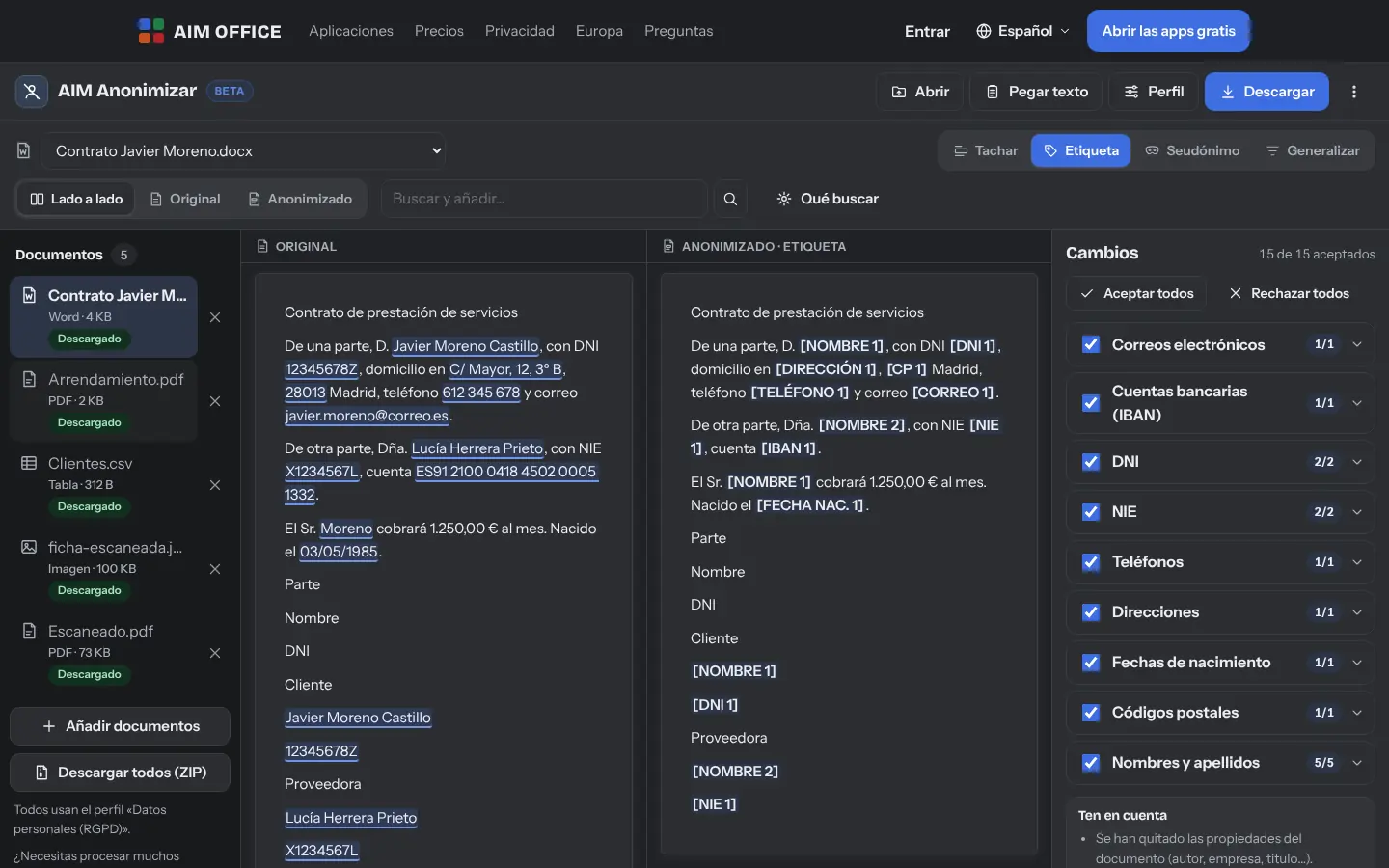
Contract in DOCX: original and anonymised side by side, with the list of data found
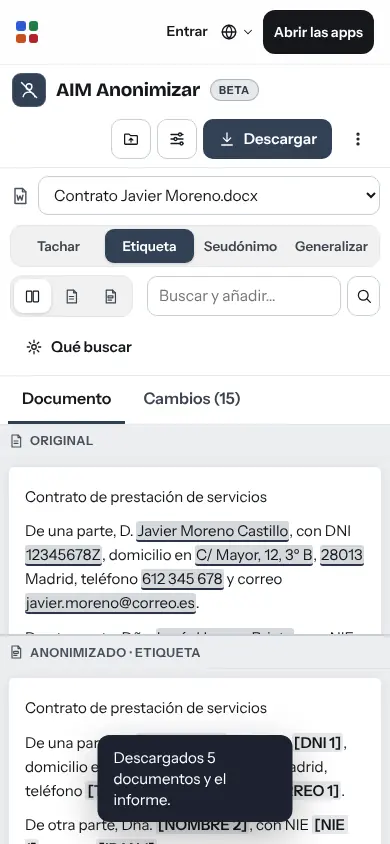
AIM Anonymise on mobile

Sound familiar?

What usually happens, and how AIM Anonymise solves it.

  • You have to share a document and black out every ID number and phone by hand.

    AIM Anonymise finds ID numbers, IBANs, phone numbers, emails and names, and removes them for you.

  • You black out a PDF with a box and the text is still underneath.

    What you redact disappears from the PDF: not under the box, not in the text layer, not in the metadata.

  • Uploading personal data to a website to clean it is exactly what you wanted to avoid.

    Everything happens on your computer: the document never leaves your browser.

How it works

Getting started is this simple. And this is what you'll see: screenshots of the real app.

  1. Drop in the document

    DOCX, PDF (scanned too), XLSX, CSV, text or an image. You can add several at once.

  2. Review what it found

    You see the original and the result side by side, with each piece of data marked by type. Accept, reject or add anything missing by selecting it.

  3. Download the clean document

    In its same format, without the data you’ve approved, in either the text or the metadata, and with a report of what was removed. The PDF comes out with its pages as images and the spreadsheet without formatting or formulas.

Contract in DOCX: original and anonymised side by side, with the list of data found
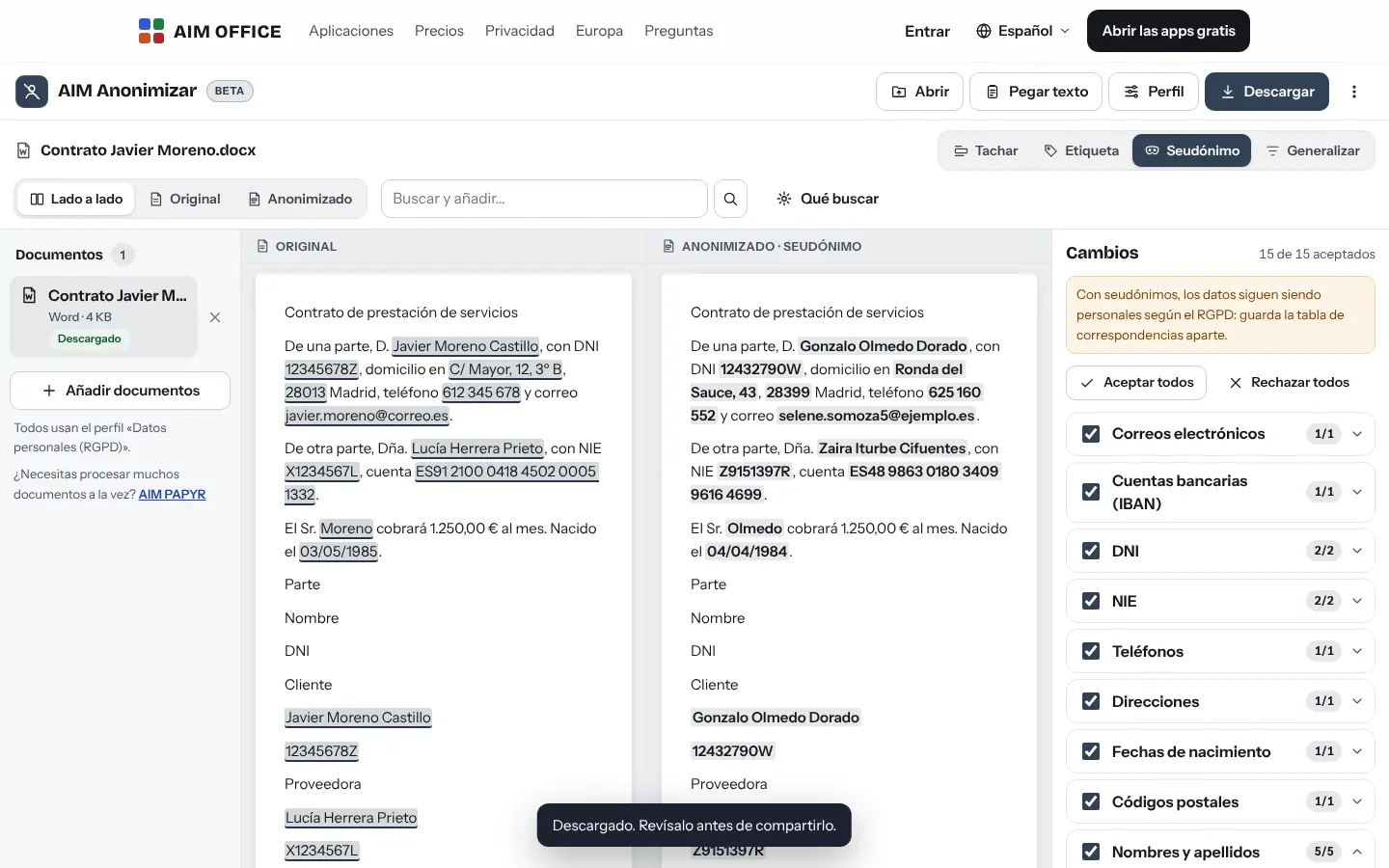
Pseudonyms: data replaced with consistent fictitious values
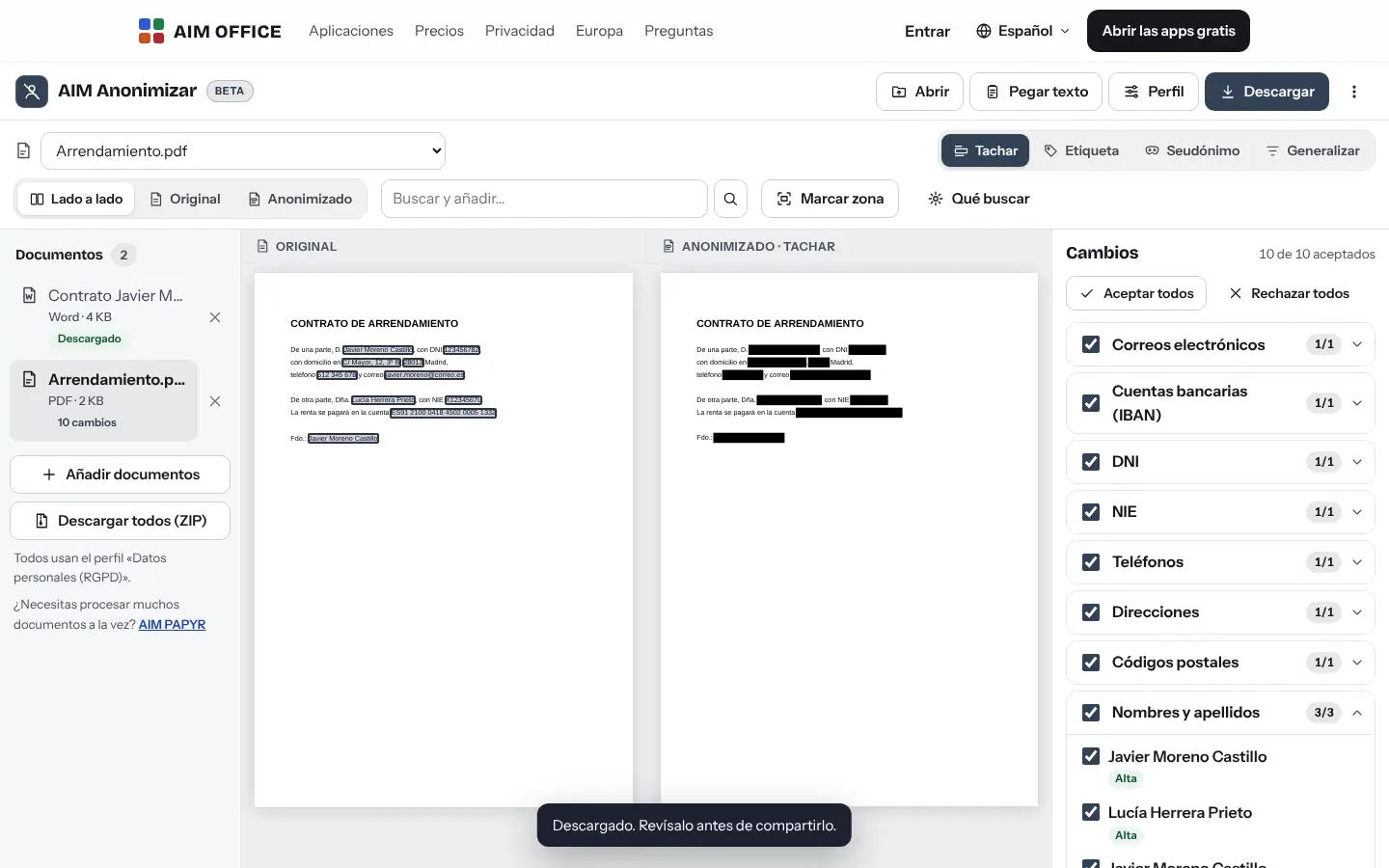
PDF with the data blacked out
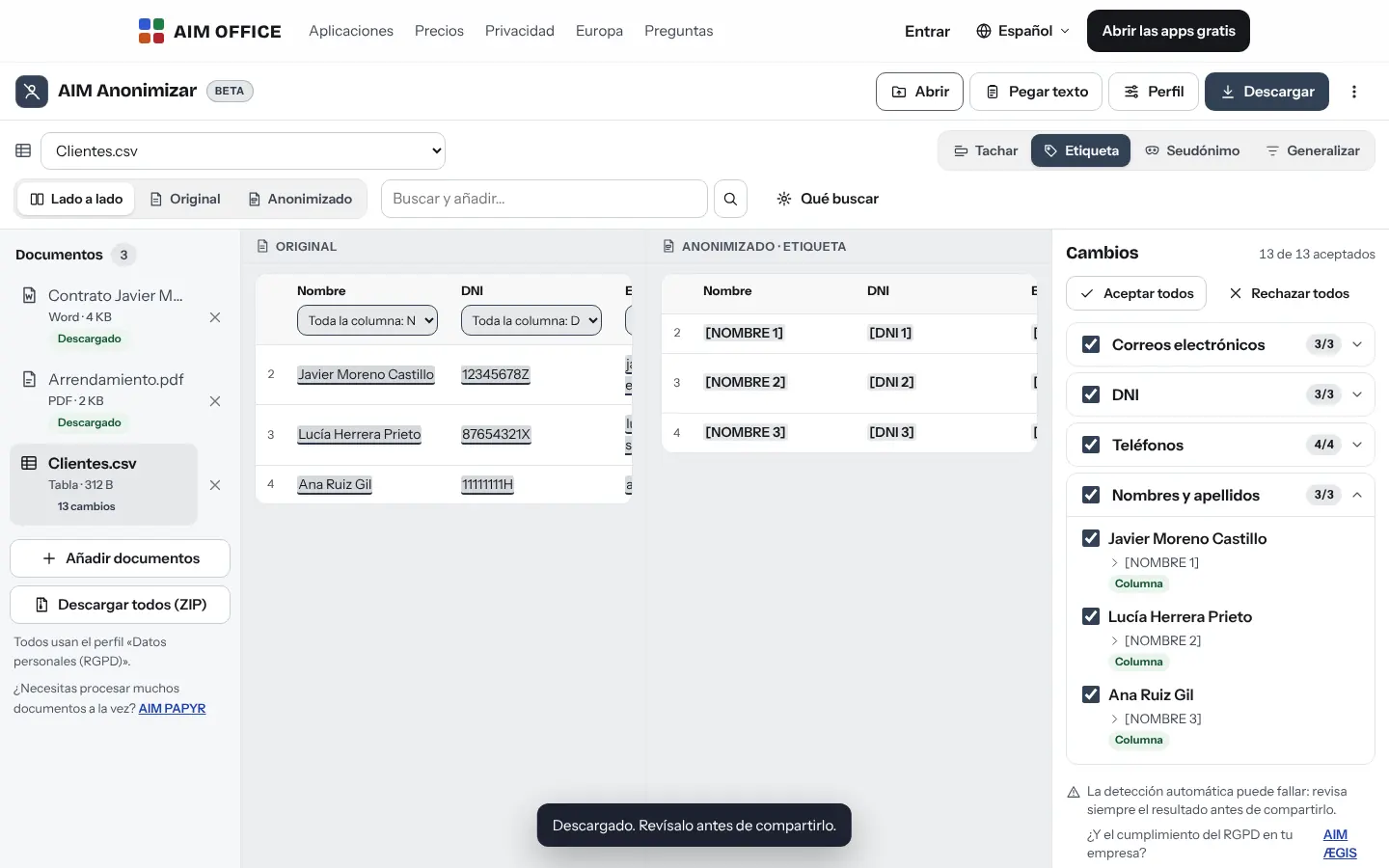
CSV sheet with the suggested personal-data columns
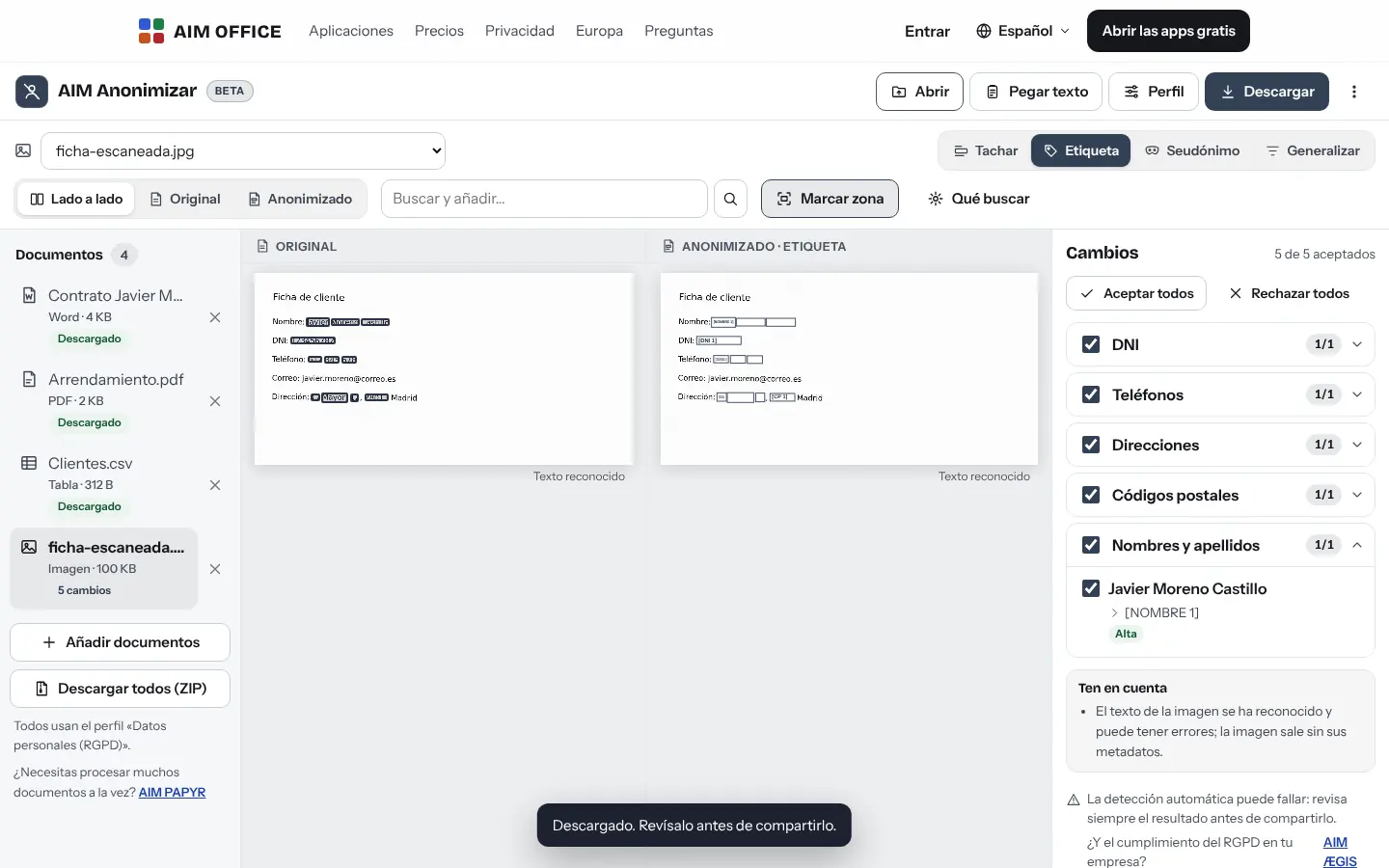
Scanned image with the text read and the data covered
AIM Anonymise on mobile
AIM Anonymise in the Night style

What you can do

Everything AIM Anonymise does today, told by what it solves for you.

Finds what you'd miss

Spanish ID, foreigner ID and tax ID numbers with their check letter, IBANs, cards, Social Security numbers, phone numbers, email addresses, IP addresses, number plates, postal addresses, postcodes, dates, amounts and people's names.
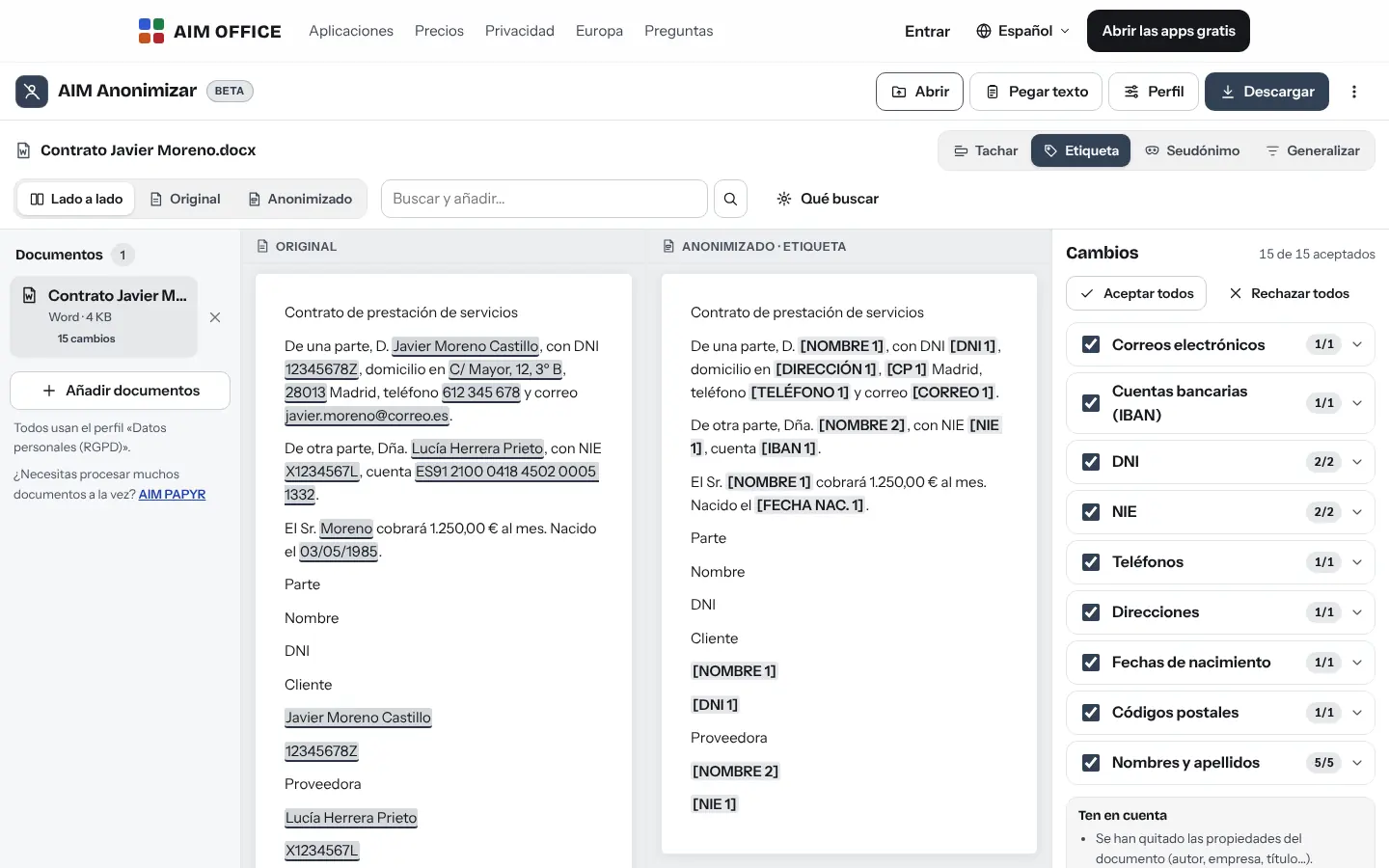
Contract in DOCX: original and anonymised side by side, with the list of data found

Four ways to remove data

Black it out with a box, add a label ([NAME 1], [ID 2]), replace it with a fictitious pseudonym that keeps the format, or generalise it (a date becomes the year, a postcode becomes the province).

Pseudonyms: data replaced with consistent fictitious values

Truly redacted PDFs

What’s struck out disappears from the PDF: it doesn’t remain under the black block, nor in the text layer, nor in the metadata. Each page comes out as an image with the remaining text, so it weighs more and keeps no links or forms. You can also cover areas by hand.

PDF with the data blacked out

Spreadsheets, column by column

In CSV and XLSX, AIM Anonymise suggests which columns hold personal data and changes only those cells. The workbook is rebuilt with its sheets and values: without formatting or formulas (their results are kept).

CSV sheet with the suggested personal-data columns

In images and scans too

It reads the text in images and scanned PDFs on your device and covers the data found in the image itself.

Scanned image with the text read and the data covered

Consistent across the whole document

The same person is always [NAME 1], even when they appear by surname alone. With pseudonyms, you download the mapping table.

Your own terms and profiles

Add client or project names that must also be removed, and save profiles: personal data under the GDPR, redacted for sending, for an AI, statistics…

Documents with all their parts

It reviews the body, headers, footers, notes and tables and accepts pending changes. It removes comments, properties, embedded objects, image metadata and what isn’t visible: fields, links, bookmarks and alternative texts. If you want, it also empties the images.

Who it's for

SMEs, freelancers and firms that already work this way.

A law firm

Rulings and filings without the parties' details, to use as models or send to people who mustn't know them.

Human resources

Staff lists in XLSX without ID numbers or IBANs before sharing them with a supplier or a consultancy.

A clinic

Reports without the patient's name or phone number for a case review or a publication.

Before using an AI

Remove the personal data from a document before you paste it into any artificial intelligence assistant.

Works with the rest of AIM

Each app does its own job and hands the work on to the next.

Privacy and security

What stays on your device, what travels encrypted and what we store. No small print.

  • Nothing leaves your device

    Documents are read, analysed and cleaned in your browser. They aren't sent to our servers.

  • Image reading on your device

    Text in images and scans is recognised in your browser. The first time, the reader is downloaded from our website.

  • What the server keeps

    Nothing from your documents. The report you download says which types of data were removed, without the original data.

  • What your browser stores

    The originals you open are saved in this browser so you can keep reviewing them, until you delete them with “Delete the saved originals”. The backup includes your profiles, settings and decisions, never the originals.

Biomag S.L.U., a Spanish company. Hosted in Amsterdam (EU), with no advertising and no trackers. Read the privacy policy

Free and Pro

Start free, no card. Pro only if you need it.

Pro

From €1.99€1.99 a month with annual billing, or €2.49 a month paying every 6 months. VAT included, no commitment.

  • All of AIM Anonymise's features, nothing held back on either plan
  • AIM Cloud: 50 GB for your documents, from any computer
  • Advanced PDF in AIM PDF: OCR, certificate signing, redaction and comparison
See everything Pro includes

Frequently asked questions

Does it find all the personal data?

It finds data with a recognisable format (ID numbers, IBANs, phone numbers…) very reliably, and names from context. No automatic detection is perfect: always review the result before sharing.

What's the difference between anonymising and pseudonymising?

When you redact, label or generalise, the data disappears. With pseudonyms, it is replaced with fictitious data and you keep the mapping table: under the GDPR, that is still personal data for whoever holds the table.

What formats does it support?

Text, documents (.docx), PDF (scanned too), spreadsheets (.xlsx), CSV and images, up to 80 MB each. The result downloads in the same format: the PDF with its pages as images and the remaining text; the spreadsheet with its data, without formatting or formulas.

Are my documents uploaded anywhere?

No. Everything, including reading images, happens on your device. The originals stay saved in this browser until you delete them.

Can I use it to send documents to an AI?

Yes, that's one of its uses: there's a profile designed for it.

Try it now. It's free.

No sign-up, no card and nothing to install. It opens in your browser in a second.