A sales pipeline that explains itself
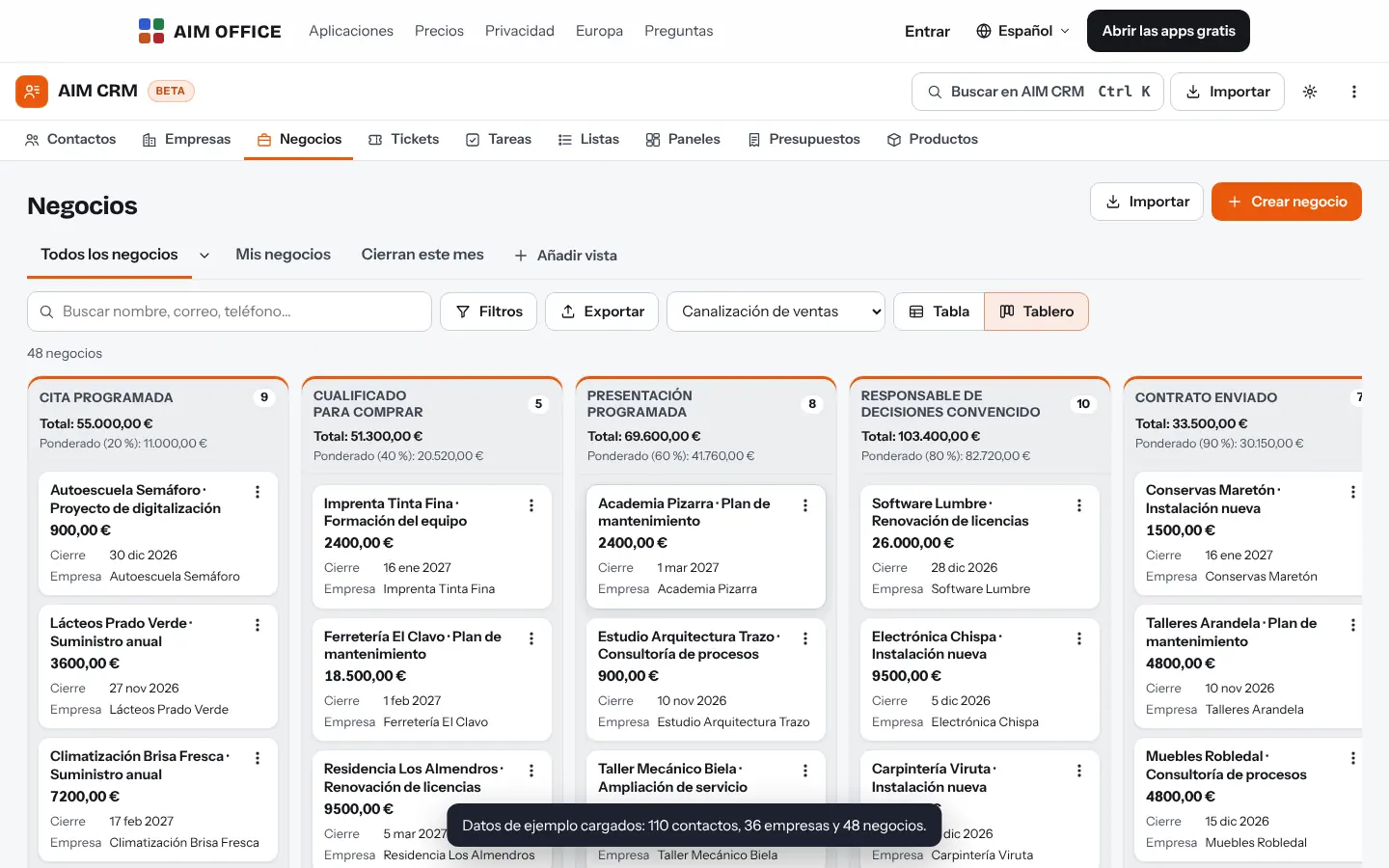
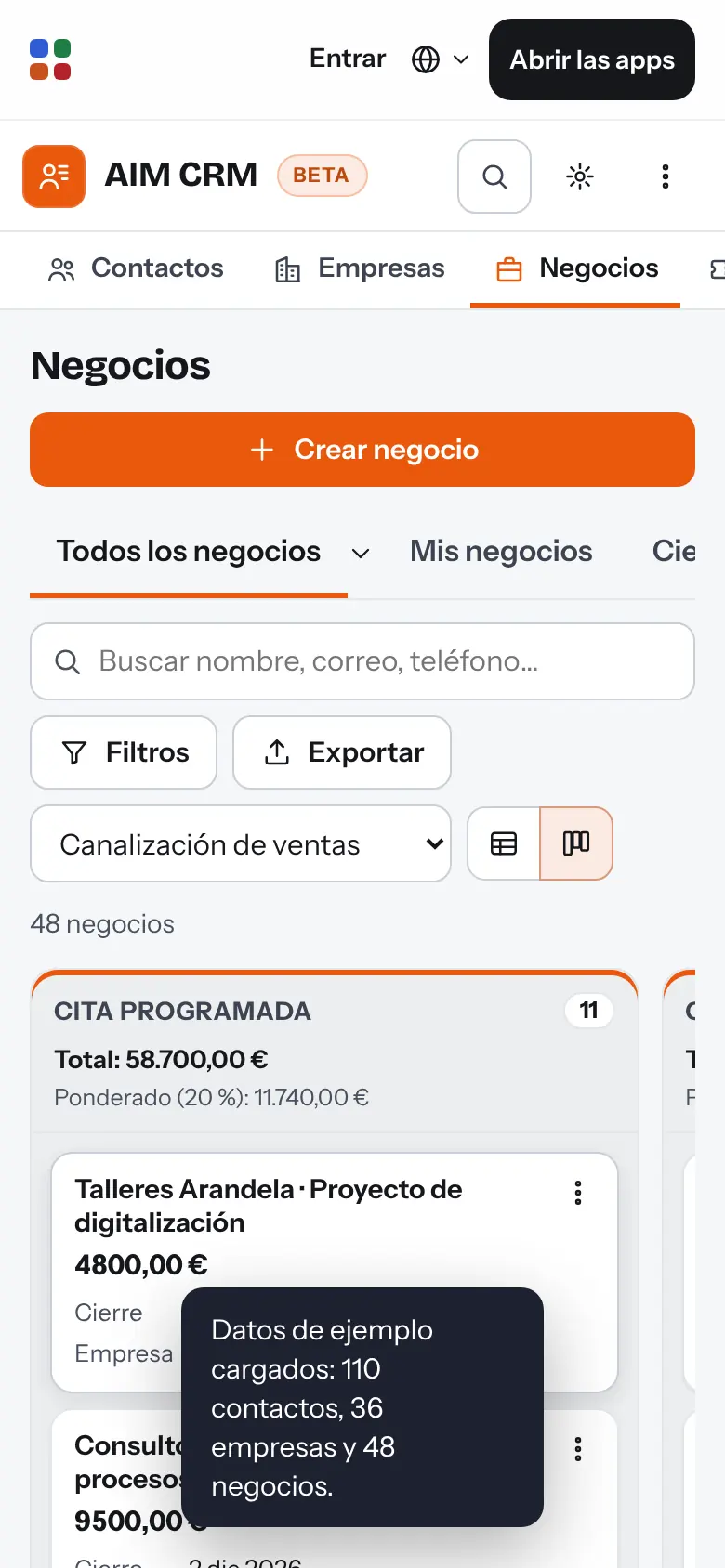
See all your deals on a board by stage or in a table, with each column's total. Change the stages and their probabilities, and create several pipelines if you sell different things.
AIM CRM
Contacts, companies, deals, tasks and quotes in one place, with a sales pipeline you can read at a glance. Free, with no per-user fees and your data on your device.
What usually happens, and how AIM CRM solves it.
Your customers are scattered across spreadsheets, email and each salesperson's memory.
AIM CRM brings together contacts, companies, deals and tasks, and imports your XLSX and CSV files without duplicates.
CRMs charge per user per month, and for a small business the bill soars.
AIM CRM has no per-user fees, and your data stays on your computer.
Every quote with VAT in a spreadsheet ends up with a broken formula somewhere.
Quotes with VAT by rate, sequential numbering per year and a PDF with your company details.
Getting started is this simple. And this is what you'll see: screenshots of the real app.
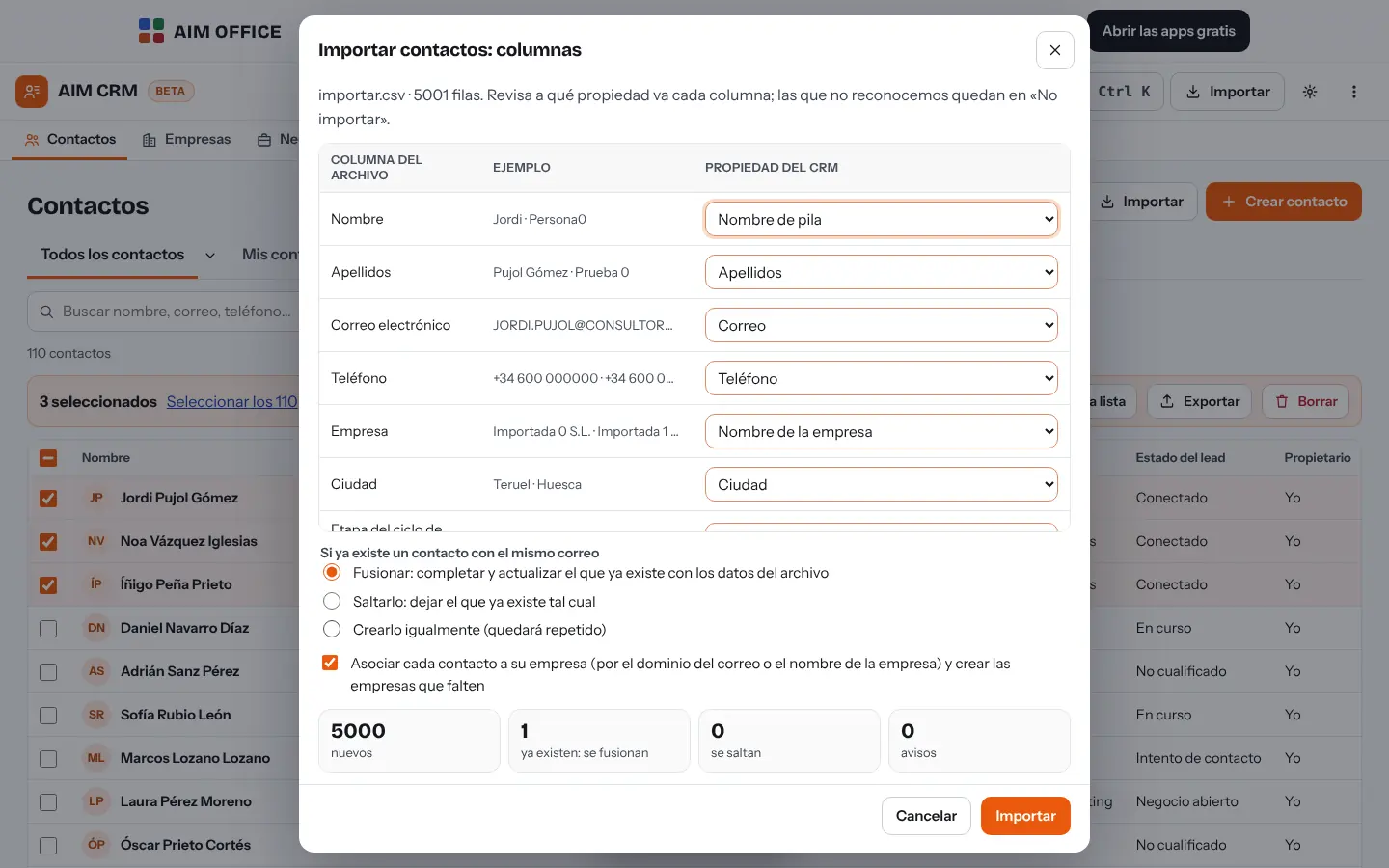
Import your spreadsheet or CSV: AIM CRM recognises the columns, detects duplicates by email and lets you review before creating anything.
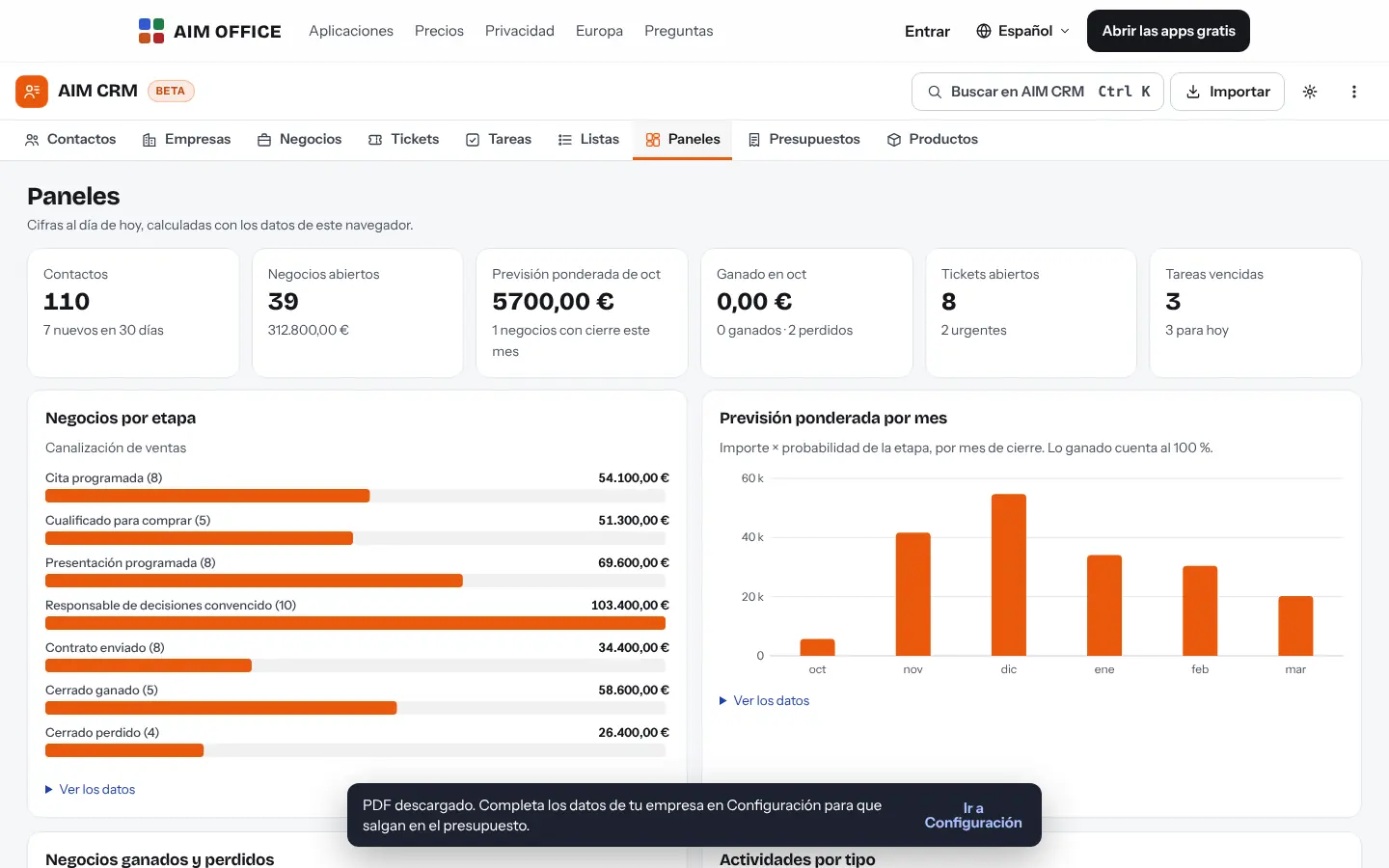
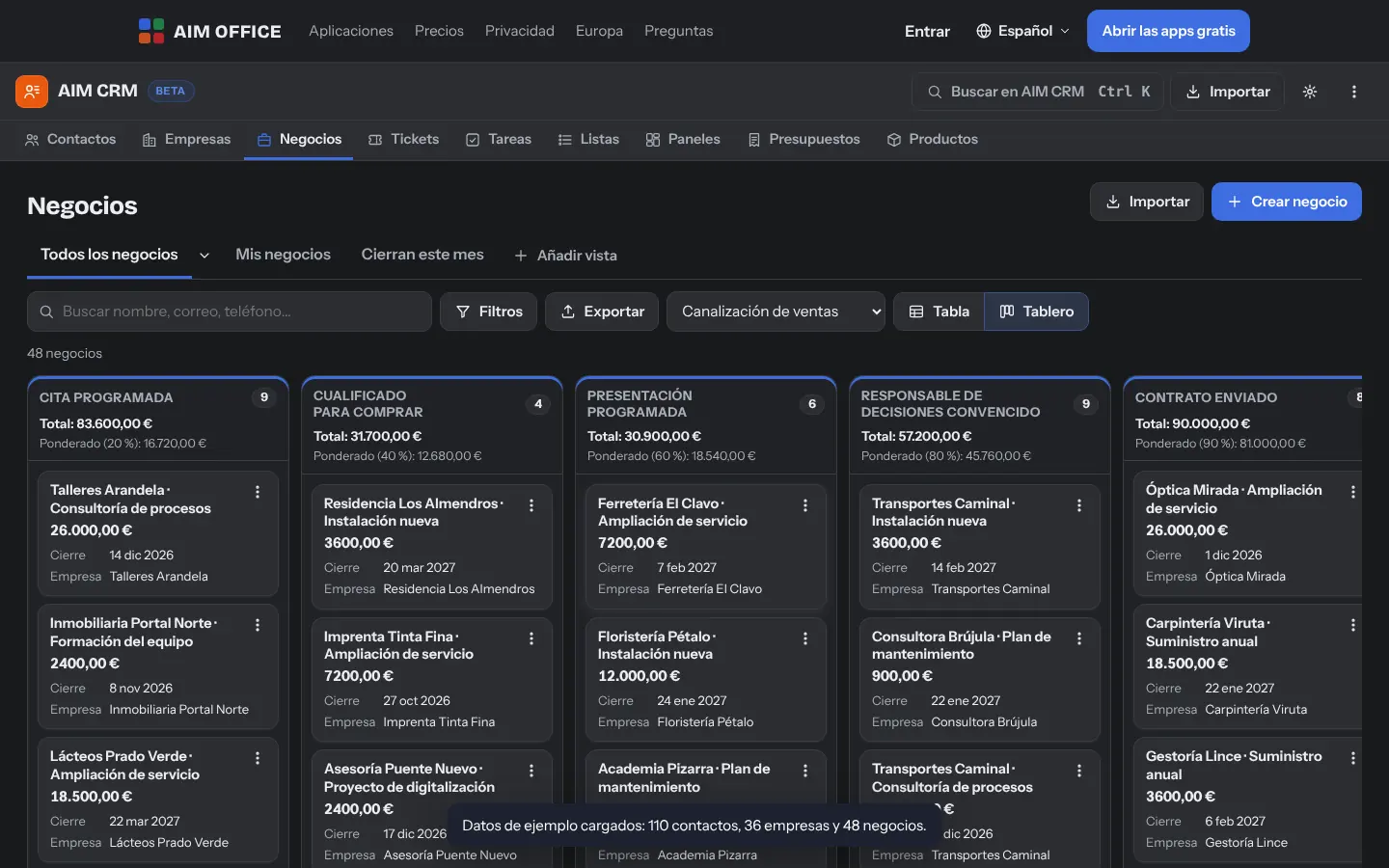
Drag your deals through the stages of your pipeline. Each stage has its own probability, so your sales forecast calculates itself.
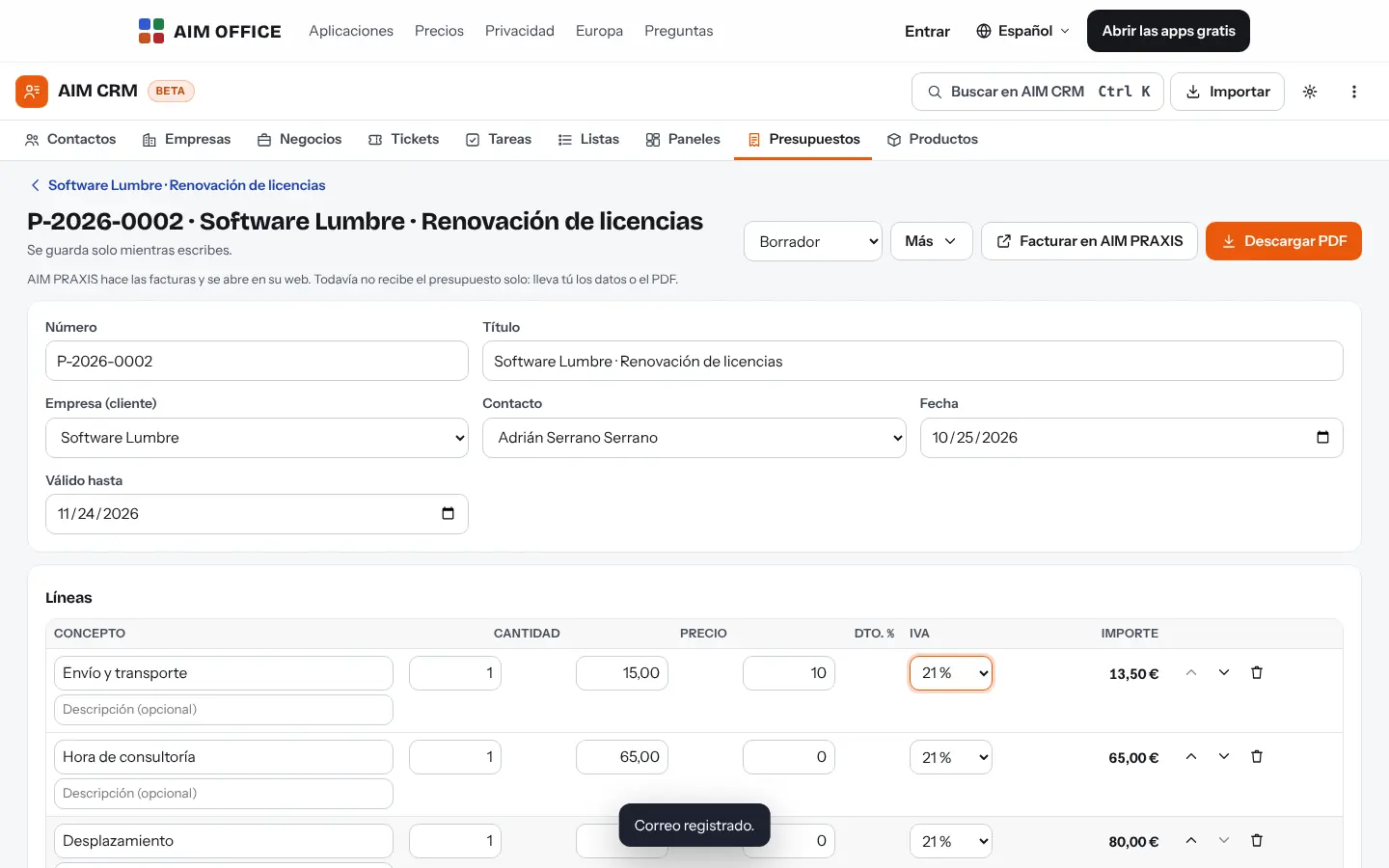
Prepare the quote with its lines, discounts and VAT, download it as a PDF and mark the deal as won when they say yes.
Everything AIM CRM does today, told by what it solves for you.
See all your deals on a board by stage or in a table, with each column's total. Change the stages and their probabilities, and create several pipelines if you sell different things.
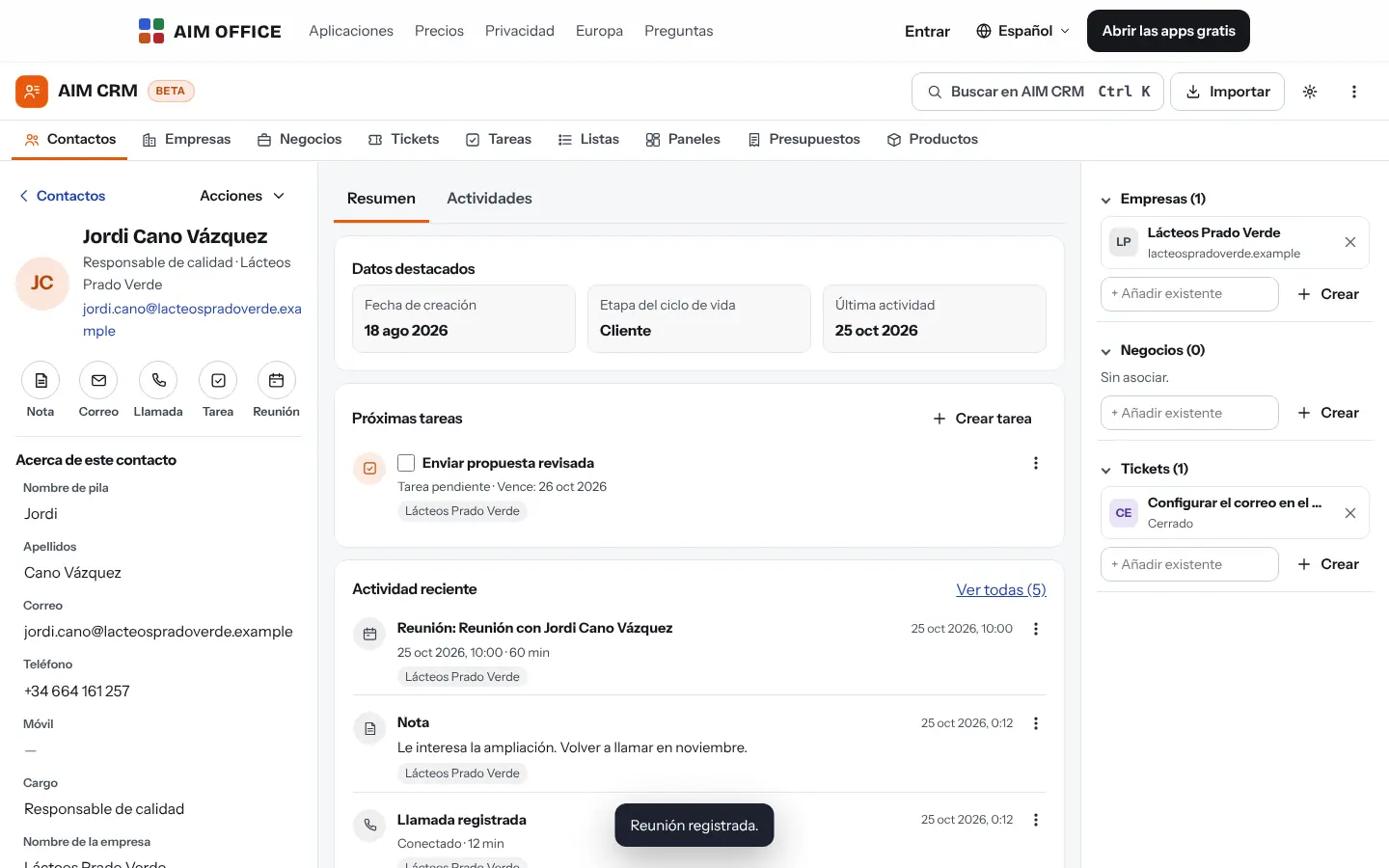
Contacts, companies and deals each have a record with details, notes, logged calls, emails and meetings, and everything associated at the side: who works at which company and which deals are open.
Lines with quantity, price and discount, VAT by rate and rounding to the cent. Numbering runs consecutively by year and the PDF comes out with your company details, ready to send.
Deals by stage, won and lost by month, activities by type and a weighted forecast: what's open multiplied by its probability, so you know what to expect each month.
Upload an XLSX or CSV and AIM CRM suggests which column goes to each property. If an email address already exists, you choose to merge, skip or create; if a row has an error, it tells you which. And with your AIM account, the messages from your AIM Sites website form arrive encrypted in the Forms inbox: you add them as contacts, with the consent text they accepted and without duplicating by email.
Calls, emails and follow-ups with due dates, and a view that tells you what is due today and what is overdue. Plus simple rules: when a message arrives from your website, someone books in AIM Bookings or a deal changes stage, AIM CRM creates or completes the contact without duplicating it, adds a tag, creates a task or moves the deal. It comes with three recipes ready to turn on. Every step is recorded in a log with “Undo”, nothing is processed twice and a rule isn’t triggered by what it does itself. They run while AIM CRM is open in your browser: the server runs nothing with your data.
Filter by any field (accent-insensitive text, numbers, dates and checkboxes), save the view, and create active lists that update themselves or fixed lists for a campaign.
Your customers' issues, on their own board by status and priority, linked to the contact and company that opened them.
Add the properties you need to contacts, companies and deals, and keep your product catalogue to drop items into a quote with one click.
With the Pro plan you share a CRM with up to 3 people (1 team): owner, editor or reader, invitation with link and code, and removal whenever you want. Everything is encrypted in each person's browser before it leaves. It works offline and changes upload on their own when the network returns; if two people change the same thing at the same time, the record shows both values so you can choose. Invited people don't need the Pro plan.
SMEs, freelancers and firms that already work this way.
Every client with their company, their contact person and the services they've signed up for. Annual renewals are dated deals, and nobody misses their follow-up call.
Every job starts as a deal: site visit, quote, negotiation and accepted. The quote with VAT comes out as a PDF straight from the record.
Several pipelines, one for projects and another for monthly fees, each with its revenue forecast by month and the tasks for each account.
Import your customer base from your trusty spreadsheet, create lists by area or by sector and track each customer's issues as tickets.
Each app does its own job and hands the work on to the next.
When you win a deal, “Invoice in AIM PRAXIS” opens its website to create the invoice with Veri*factu. It can't receive the quote automatically yet: bring the details or the PDF yourself.
Email a contact from their record with AIM Mail and log it in their activity.
The meetings you log download as an .ics invitation for AIM Calendar or to send to attendees.
Export your contacts to CSV and open them in AIM Labels to print envelopes or address labels.
Messages from your AIM Sites website form arrive encrypted in the Forms inbox.
Add the people who book on your AIM Bookings page as contacts, from the Forms inbox.
What stays on your device, what travels encrypted and what we store. No small print.
Your personal CRM (contacts, companies, deals, tickets, quotes and settings) is stored in your browser and is not sent to our servers. If you share it with a team, it travels encrypted.
Download a full backup whenever you like and load it on another device. Export to XLSX and CSV too, open formats you can take anywhere.
From your personal CRM, nothing. From a team CRM, only data encrypted in each member's browser, which we cannot read, and what is needed to distribute it: who is a member, with what role and when something changed. The personal CRM needs no account; the team one does. There is no analytics or advertising. If you receive the form from your website, each message waits on the server encrypted in the browser of the person who writes it (we cannot read it) until you add it or discard it, and then it is deleted.
Biomag S.L.U., a Spanish company. Hosted in Amsterdam (EU), with no advertising and no trackers. Read the privacy policy
Start free, no card. Pro only if you need it.
€0Forever. No sign-up, no card.
From €1.99€1.99 a month with annual billing, or €2.49 a month paying every 6 months. VAT included, no commitment.
As many as your browser can hold, which is usually many thousands. We tested 5,000 contacts and searching, filtering and sorting stay instant.
Yes, with the Pro plan: 1 team of up to 3 people, counting invitations not yet accepted. Before moving your CRM to the team, a copy is downloaded and another stays in your browser; your personal CRM is not deleted. Sample data is not uploaded to the team.
Yes, if you export them to XLSX or CSV. AIM CRM recognises the columns by name (synonyms too), splits the full name into first and last names and warns you about duplicates before importing.
No: it does quotes. Invoices, with Veri*factu and TicketBAI, are made in AIM PRAXIS, which opens on its own site.
No. They run in your browser when you open AIM CRM (and every few minutes while it stays open), because that is the only place your encrypted messages and bookings can be opened. Whatever arrives while it is closed is processed the next time you open it. They don’t send emails yet and don’t react to AIM Sign signatures.
It goes to the bin and you can recover it. It's also worth downloading a backup from time to time.
Yes. When you open it you can load fictitious SMEs to try everything. They're marked and, whenever you like, only they are deleted, without touching your own data.
Each member has a copy of the team CRM to work offline until they sign out of their account, leave the team, or another account signs in on that browser: then it is deleted (if there are changes not uploaded, you are first offered to upload them or download a copy). Any member, including those with the reader role, can export: whoever can read can copy, and what someone has already downloaded cannot be deleted remotely. When someone is removed, the team changes key and they stop receiving anything new. The personal CRM stays in the browser, as always.
No sign-up, no card and nothing to install. It opens in your browser in a second.