Skip to content
AIM OFFICE

AIM Sign

Sign and collect signatures without printing or scanning.

Sign your PDFs in a minute or request signatures through an encrypted link, in the order you want. Each signature leaves a certificate with the document's fingerprint and the time, IP address and browser of each step.

  • Signers don't need an account
  • Evidence certificate
  • Encrypted document
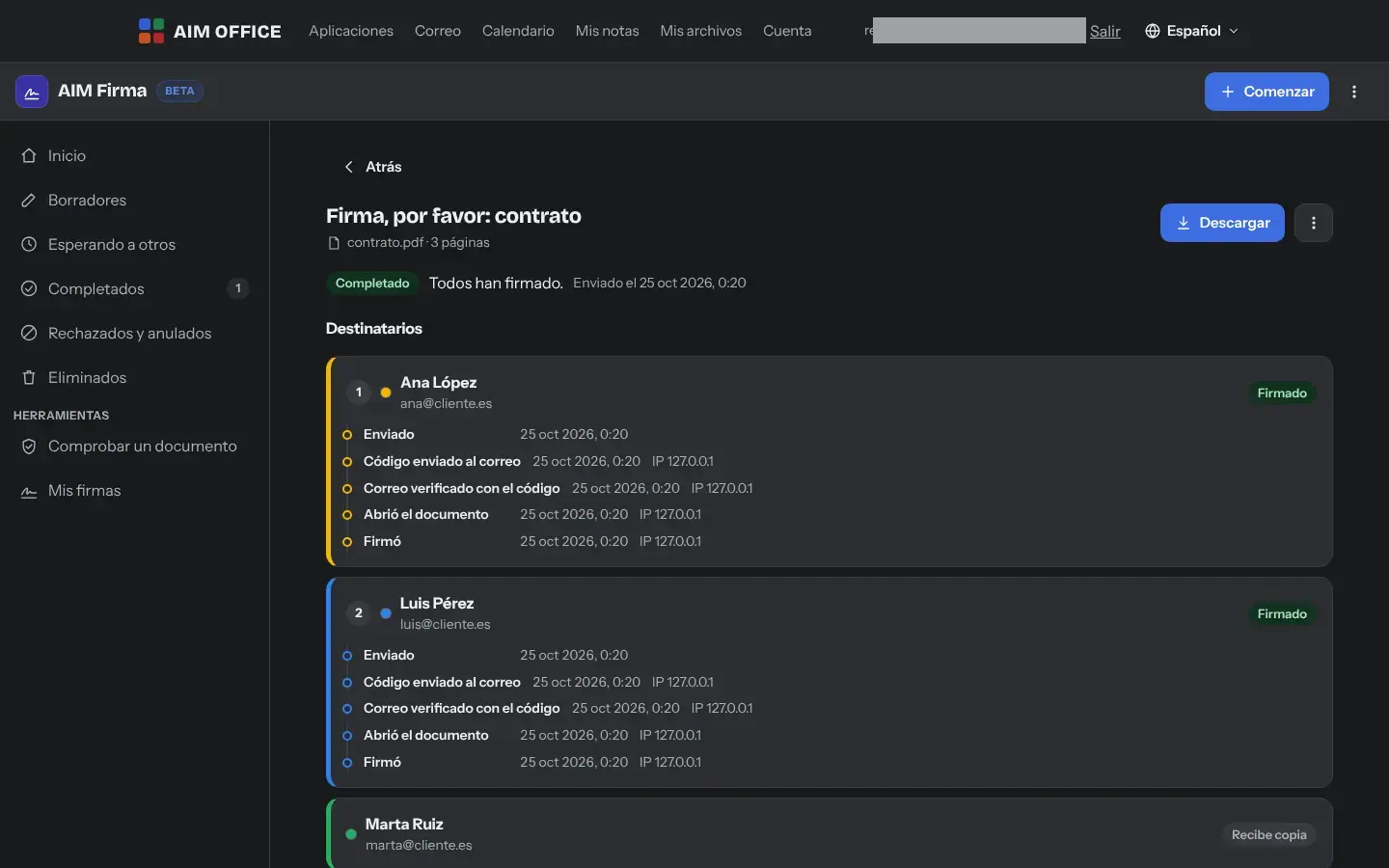
Tracking a completed envelope: each signer with their steps, time and IP
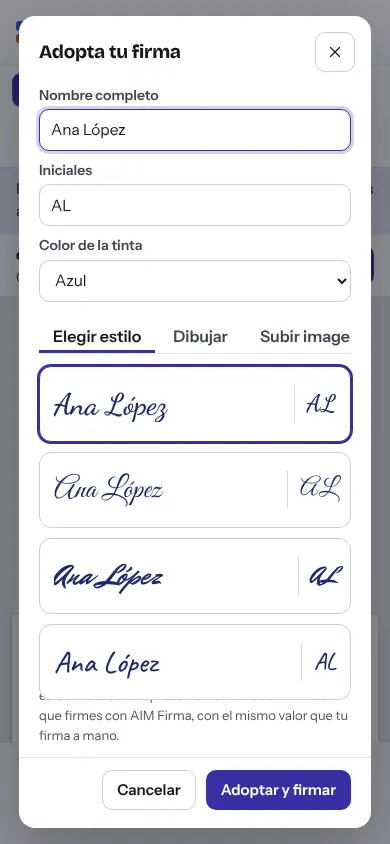
Signing from a phone

Sound familiar?

What usually happens, and how AIM Sign solves it.

  • Print, sign, scan and send it back, for a single signature.

    Sign your PDF in a minute, with your signature typed, drawn or uploaded as a photo.

  • You chase every person who has to sign by email.

    You can see who has opened, signed or declined it, and you resend their link, with the message already written, to anyone who is running late.

  • Whoever has to sign must create an account on yet another service.

    They sign from a link, on a computer or phone, with no account and nothing to install.

How it works

Getting started is this simple. And this is what you'll see: screenshots of the real app.

  1. Upload the PDF

    Drag it into the window. Choose “Sign a document” if only you are signing, or “Send for signature” if you need other people to sign.

  2. Place the fields

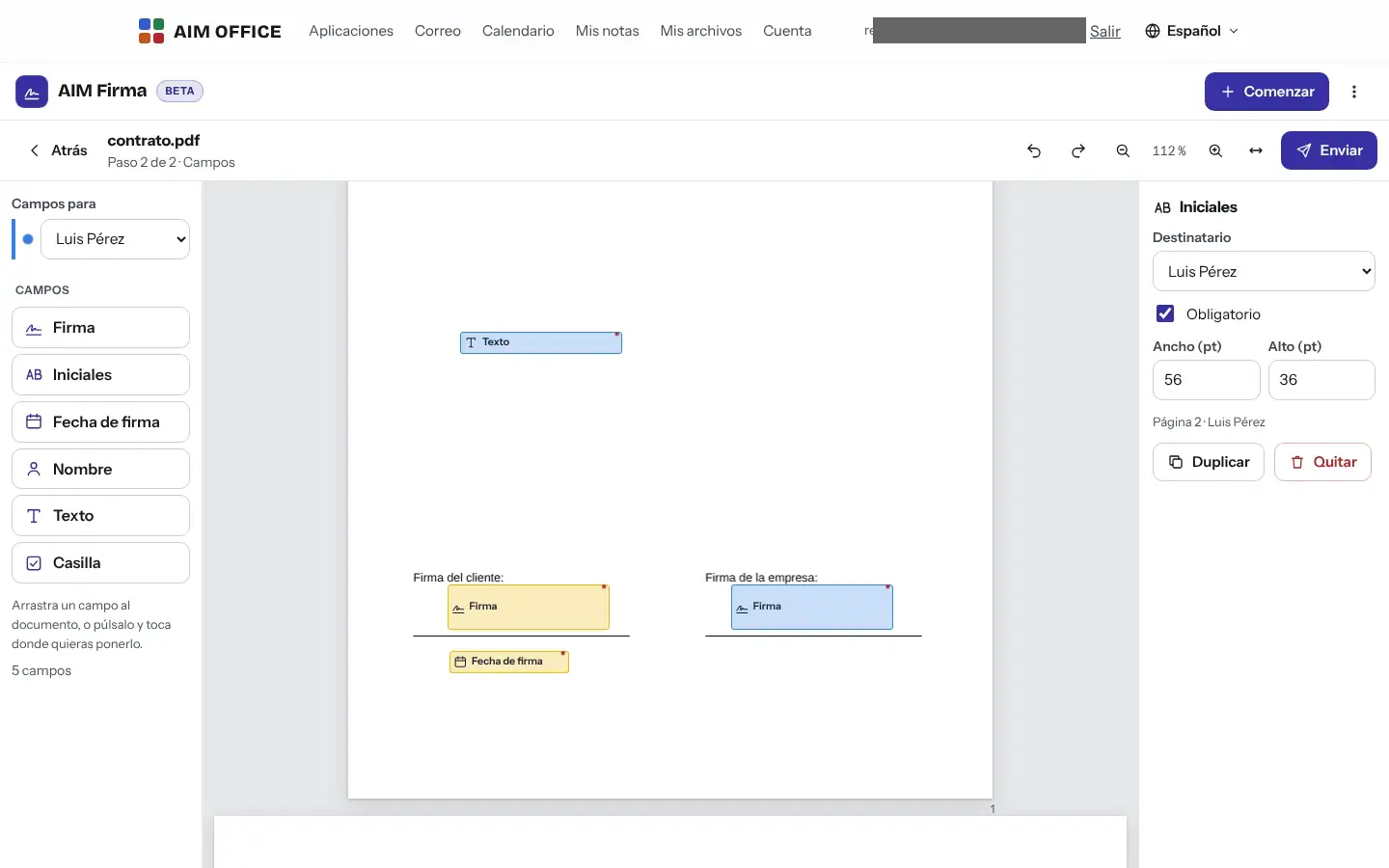
    Place each signature, initials, date, name, text or checkbox, and say who each one is for. Decide whether people sign in order or all at once.

  3. Send and track progress

    Each signer receives their own link. You can see at any time who has opened it, who has signed and whose turn it is, and at the end you download the signed PDF with its certificate. It is assembled in your browser when you open AIM Sign: until then, signers and copy recipients cannot download it.

Tracking a completed envelope: each signer with their steps, time and IP
Preparing the envelope: signature, initials and date fields for each recipient
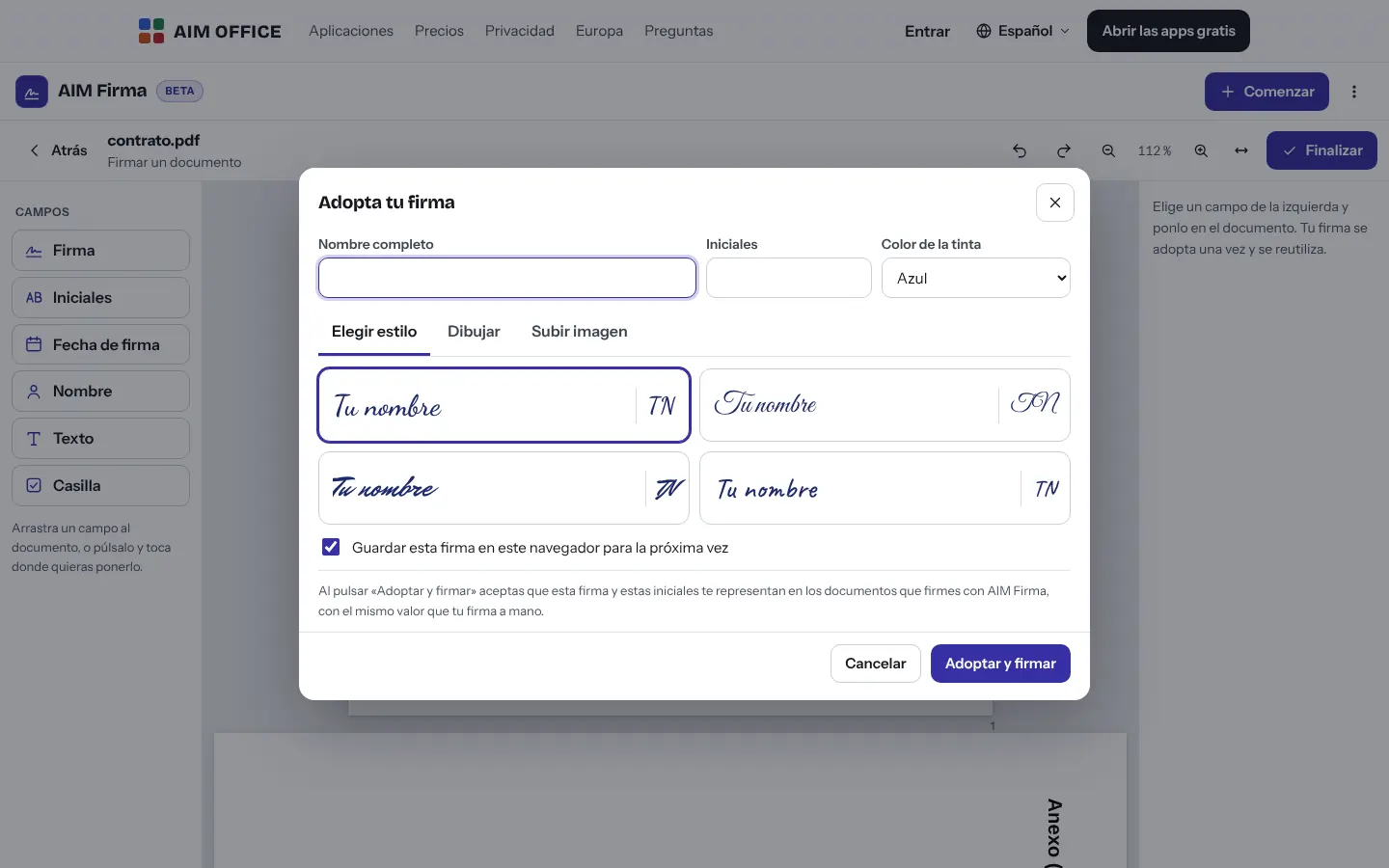
Adopt your signature: choose a style, draw it or upload an image
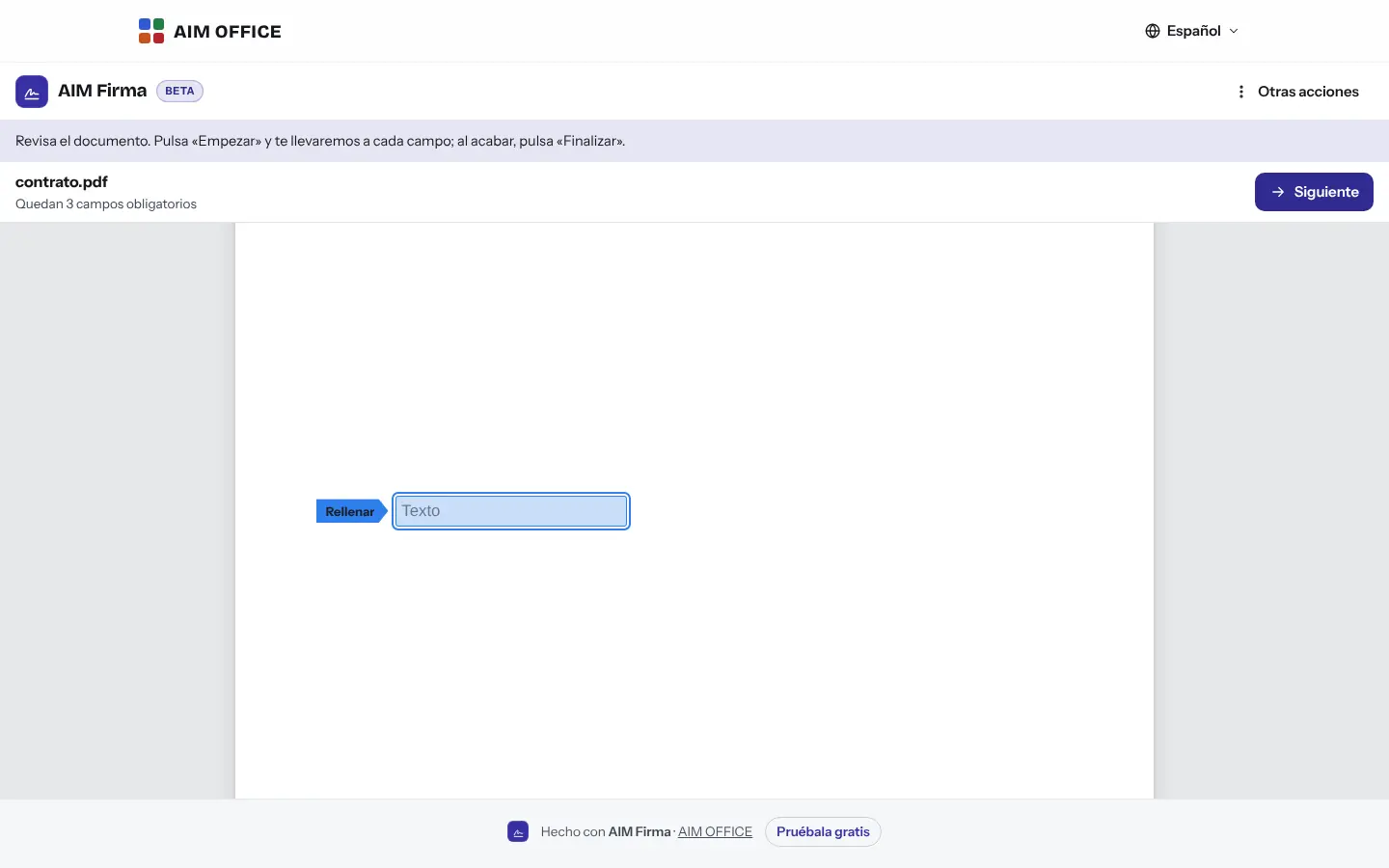
What the signer sees: the document with their field highlighted and the Next button
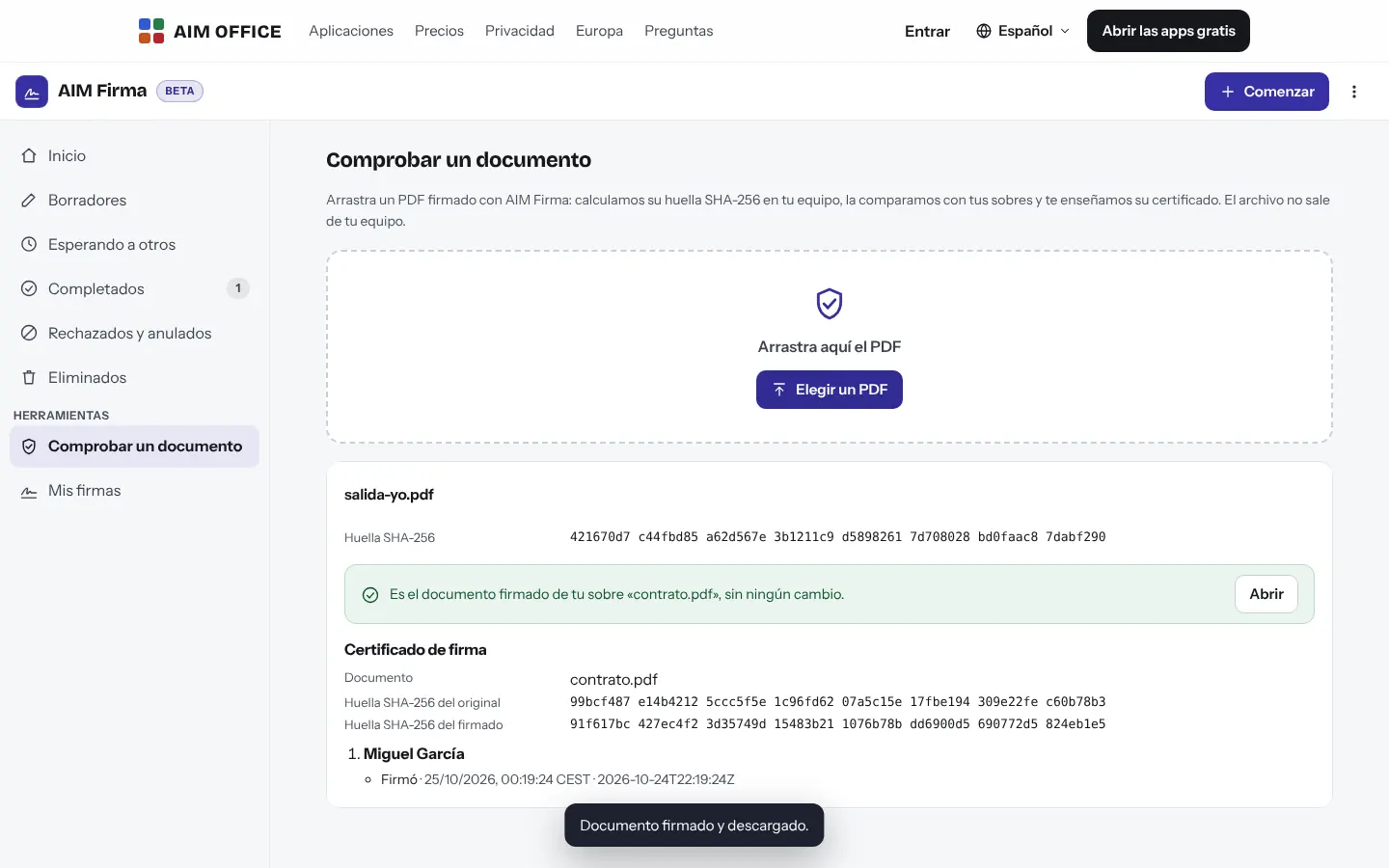
Check a document: the PDF's fingerprint matches its certificate
Signing from a phone
AIM Sign in the Night style: tracking an envelope

What you can do

Everything AIM Sign does today, told by what it solves for you.

You know where every signature stands

For each envelope: who received it, who has verified their email, who has opened, signed or declined it, with the time and IP address of each step. With “Remind”, you resend their link to anyone who is running late through AIM Mail or your own email, with the message already written.
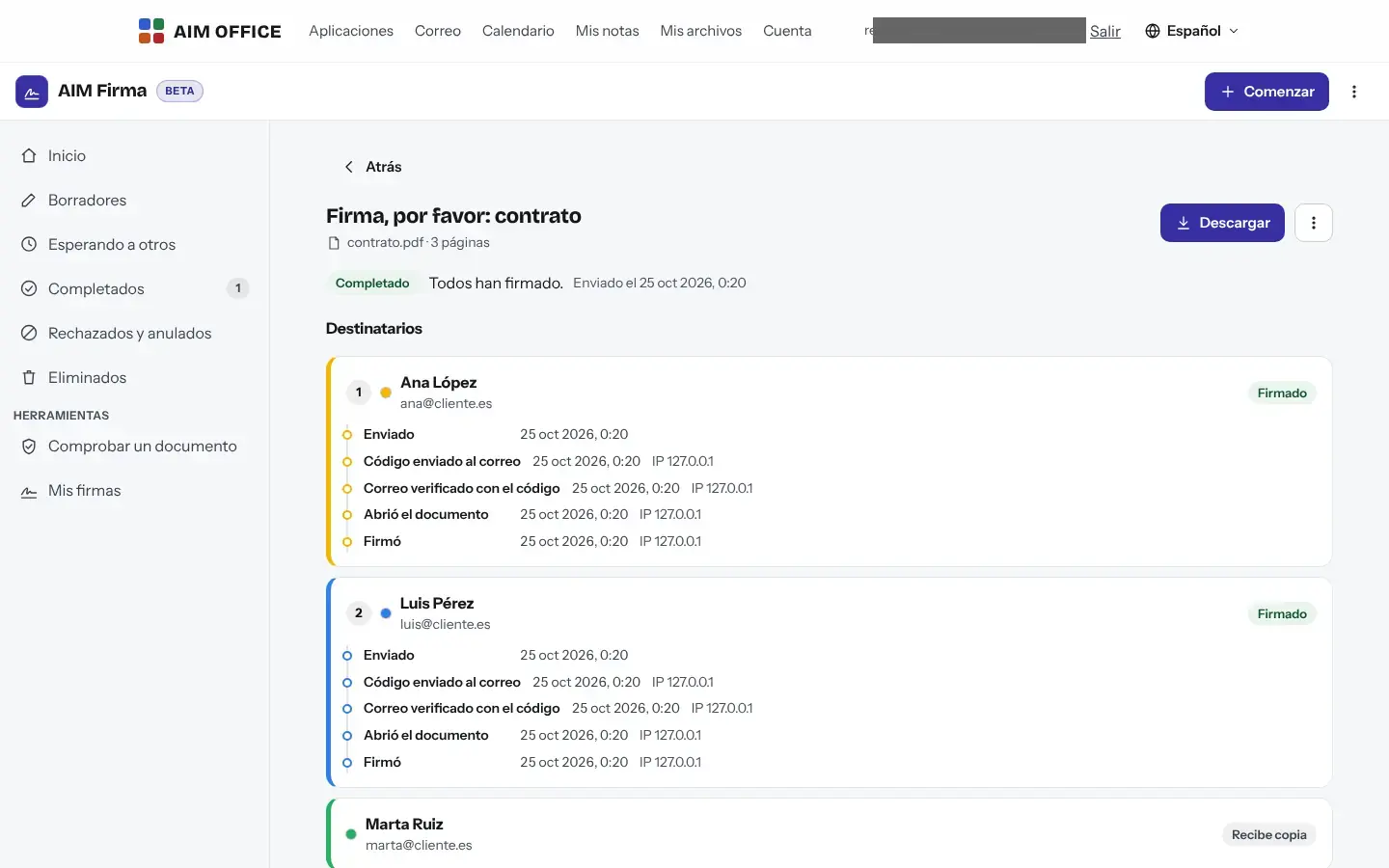
Tracking a completed envelope: each signer with their steps, time and IP

Fields exactly where they belong

Signature, initials, date signed, name, text and checkbox, for each recipient, required or optional. With signing order, each person signs after the previous one; with the same number, at the same time. You can also send copies to people who only need to receive it.

Preparing the envelope: signature, initials and date fields for each recipient

Your signature, your way

Type it in a handwriting style, draw it with your mouse or finger, or upload a photo of your signature on paper: we remove the background. It's stored only in your browser.

Adopt your signature: choose a style, draw it or upload an image

Signing is easy for the other person

The signer opens the link on a computer or phone, confirms with a code sent to their email, and AIM Sign guides them field by field to “Finish”. No account and nothing to install.

What the signer sees: the document with their field highlighted and the Next button

Check any signed document

Drop a PDF signed with AIM Sign, or the ZIP of an archived envelope: we calculate its SHA-256 fingerprint on your device and compare it with the AIM Sign record (from any device, no account needed) and with your envelopes, and we show you its certificate. Only the fingerprint leaves your device, never the file.

Check a document: the PDF's fingerprint matches its certificate

Certificate of completion

The signed PDF ends with an evidence page showing the document's fingerprints and every step taken by every signer. With many signers, it takes as many pages as needed.

A tidy inbox

Drafts, waiting for others, completed, declined and voided, deleted. Search by document, subject or person.

Archive without losing the evidence

When you are close to your plan’s limit, AIM Sign warns you. Archive a finished envelope: you download a ZIP with the signed PDF, the certificate and all the evidence, which you can check later in the app itself, and the envelope no longer takes up space.

Decline and void, with a reason

The signer can decline and explain why, and you can void a sent envelope: its links stop working instantly.

Who it's for

SMEs, freelancers and firms that already work this way.

An estate agency

Deposit and rental agreements signed by buyer, seller and agency in order, without meeting at the office.

An accounting firm

Engagement letters and authorisations signed by the client on their phone, with the certificate kept alongside the document.

An agency

Accepted quotes with a signature and initials on every page, and tracking in plain sight so you know whether the client has opened it yet.

Human resources

Contracts and annexes signed by the new hire and by the company, with a copy for the payroll advisor.

Works with the rest of AIM

Each app does its own job and hands the work on to the next.

  • AIM PDF

    To sign with a digital certificate, or to merge, fill in or comment on the PDF before sending it, use AIM PDF.

  • AIM Mail

    Send each signer's link through AIM Mail or your email program, with the message already written.

  • AIM Docs

    Draft the contract in AIM Docs, export it to PDF and upload it to AIM Sign.

  • AIM CRM

    Send the quote you prepared in AIM CRM for signature.

Privacy and security

What stays on your device, what travels encrypted and what we store. No small print.

  • End-to-end encrypted document

    The PDF is encrypted in your browser with a key that travels in the link, after “#”, and never reaches our server. We can't read the document.

  • The evidence we keep

    To prove each signature we store each signer's email (to send them their code) and the time, IP and browser of each step. Whoever requests the signature sees them on the certificate.

  • Your account and your keys

    To send for signature you need your free AIM account. Your envelopes' keys go in your keyring, encrypted with a recovery code only you have.

Biomag S.L.U., a Spanish company. Hosted in Amsterdam (EU), with no advertising and no trackers. Read the privacy policy

Free and Pro

Start free, no card. Pro only if you need it.

Free

€0Forever. No sign-up, no card.

  • All of AIM Sign's features
  • With your free account: up to 50 shared links and 2 GB in total
Open AIM Sign for free

Pro

From €1.99€1.99 a month with annual billing, or €2.49 a month paying every 6 months. VAT included, no commitment.

  • Up to 500 shared links and 20 GB in total
  • AIM Cloud: 50 GB for your documents, from any computer
See everything Pro includes

Frequently asked questions

Is it legally valid?

AIM Sign provides a simple electronic signature with evidence: an email address verified with a code, the time, the IP address and the document's fingerprint. It is not a qualified electronic signature. If a regulation requires a specific type of signature, check before using it.

What if I need to sign with my digital certificate?

That signature is made in AIM PDF, with the advanced PDF of the Pro plan. Qualified signatures and the European digital wallet are not available.

Do signers need an account?

No. They open their link, confirm their email with a code and sign. You do need your free account to send.

Can I sign a document on my own?

Yes. “Sign a document” lets you sign in a minute and download the signed PDF with its certificate, without sending anything to anyone.

How big can the PDF be?

Up to 50 MB. If it is larger, reduce it first in AIM PDF.

How many envelopes can I have at once?

Each envelope sent takes up one of your shared AIM links (the same ones used by Bookings, Send, Chat or Meetings): 50 on the Free plan and 500 on Pro, with 2 GB or 20 GB in total. AIM Sign warns you when you reach 80% and at the limit. To make room, archive envelopes that are finished, declined or voided.

What does “Archive” do?

You download a ZIP with the signed PDF, its certificate, the original, each signer’s version and all the evidence (each step with its time, IP address and browser). You choose the saved ZIP to confirm that it is complete, and only then is the envelope deleted from the server and no longer counted towards your limit. AIM Sign keeps only the record of the fingerprints and times of the signatures, so “Verify a document” can still confirm the signed PDF and the ZIP itself. An envelope that is still awaiting signatures cannot be archived.

Can the document be changed after it's signed?

Each signer signs the latest version, and the SHA-256 fingerprint of the result is recorded in the certificate. If anyone changes the PDF, “Check a document” detects it.

Try it now. It's free.

No sign-up, no card and nothing to install. It opens in your browser in a second.